SendRCS is an RCS & SMS gateway for Europe.
Your RCS messages land in the SMS messaging app that is already on every phone - verified sender, rich media, carousels, buttons and reply chips - with automatic SMS fallback for everyone else. No app to install.
Send from your browser, from your own code or from your AI assistant.
- Free to test
- No subscription
- Pay as you go
- GDPR, servers inside the EU



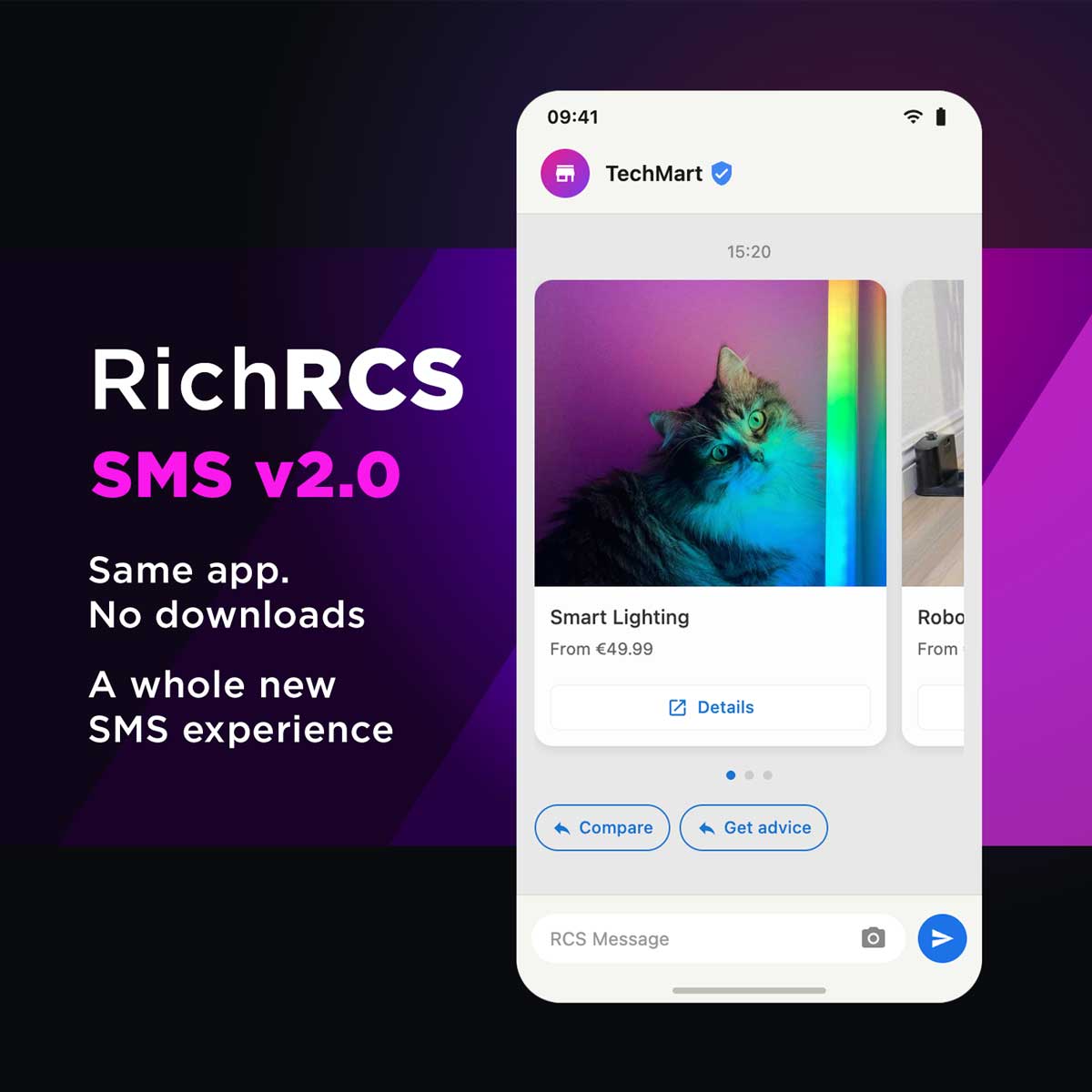
This is a real RCS Rich Card, rendered with the same building blocks our web app and API send: verified sender, image, text, buttons and reply chips.
One platform, five ways in.
Marketers click, developers call, AI agents ask, support teams reply, shops sell. Pick your role and we show you exactly how you would send RCS - and what it does for you.
Campaigns your customers can act on - no developer needed
Build the message in the browser - text with reply chips, a Rich Card, a product carousel, or an image, video or PDF - see it on a phone while you type, pick a contact group and send. Every button tap is tracked automatically, so after the send you know who read it, who clicked what and who to follow up with.
- Visual composer with live preview for every RCS message type, and an AI Designer that writes and designs the message for you.
- Contacts from CSV, groups, merge fields for personal messages, scheduling and reusable templates.
- Click analytics per campaign and per message: read rate, click-through rate and a breakdown per button - then the list of who clicked, with name and phone, to download as CSV or add to a group for the follow-up campaign.
- Opt-outs handled automatically - STOP keywords, unsubscribe chips and links, with the contact blocked for you and an unsubscribers report that shows which campaign each opt-out came from.





Real RCS markup, styled exactly as the phone shows it. Up to 4 buttons per card, reply chips under every message, 25 characters each.
- Open a URL in the browser or inside the messaging app (webview)
- Call you - one tap opens the dialler with your number
- Add to calendar - title, date, time and place prefilled
- Show a location on the map, or ask the customer to share theirs
- Reply with a prepared answer that lands in your inbox
- Unsubscribe - the contact is blocked for you, no work on your side
- Postback to your webhook - every tap, on every button type, with your own data
- Tracked automatically - who tapped what, per button, in Statistics
Know exactly what happened - and who to message next
Every RCS button and reply chip is tracked automatically - no tracking links, no setup. Open a campaign in Statistics and it is all there.
- What they clicked: every button with its click count, unique people and clicks over time.
- Who clicked: the contacts behind each button - export as CSV or add them to a group for the follow-up.
- UTM on every link: added by the AI Designer, so Google Analytics and Shopify attribute the visit to that message.
- Best time of day: volume by hour, so the next campaign goes out when people actually read.
- Unsubscribers: who opted out, when and from which campaign - exportable or added to a suppression group.
Need it in your own system? Clicks, replies and delivery status also arrive as webhooks, and your AI assistant can fetch them through the MCP connector.
One POST sends an RCS message. The SMS fallback rides in the same call.
A plain REST API with an API key. Buttons and chips carry your own postback data, and webhooks tell you who tapped what, who replied and what was delivered. Test any message in the public sandbox before you even have an account.
- Free sandbox, no API key: post any message body and get the same validation as the real endpoint plus a link that renders it on an Android and an iOS phone.
- Webhooks for button clicks, replies, delivery and read status and incoming RCS or SMS.
- Batch sending to up to 10,000 recipients per call, with merge fields and a built-in unsubscribe link.
- Contacts, groups and templates endpoints, full OpenAPI spec, and an MCP server if your agent prefers tools over HTTP.
{
  "phoneNumber": "+4512345678",
  "messageType": "richCard",
  "sendernameId": "<rcs_sender_id>",
  "content": {
    "title": "New collection just arrived!",
    "description": "20% introductory discount this week.",
    "media": { "height": "MEDIUM", "contentInfo": {
      "fileUrl": "https://sendrcs.eu/images/rcsexamples/shoes-1.jpg" } },
    "cardActions": [
      { "text": "Shop now", "type": "openUrl",
        "openUrlAction": { "url": "https://example.com" },
        "postbackData": "shop_now" },
      { "text": "Call us", "type": "dial",
        "dialAction": { "phoneNumber": "+4512345678" } }
    ],
    "suggestions": [
      { "reply": { "text": "More info", "postbackData": "more_info" } }
    ]
  },
  "smsFallback": {   // sent instead when the phone has no RCS
    "message": "New collection just arrived! 20% off: https://example.com",
    "sendernameId": "<sms_sender_id>"
  }
}Tell your assistant what to send. It builds the card, you approve, SendRCS delivers.
The MCP connector plugs SendRCS into Claude, ChatGPT, Gemini, Microsoft Copilot, Cursor and any other MCP client. Your assistant can look up contacts, compose Rich Cards and carousels, schedule campaigns, read statistics and manage conversations in plain language. With "approve before sending" on, nothing leaves without your OK.
- One URL, one login - add it as a connector and the tools appear in your assistant.
- Preview page for every message the assistant drafts, and a per-sender switch that requires your approval before it sends.
- Autoreply answers incoming RCS messages for each sender from the instructions and sources you give it, in the customer's language, and hands over to a person when it should.
- Agent discovery - the server card, OpenAPI spec and llms.txt are published, so coding agents find the right call on their own.
Setup
In your AI client’s MCP server settings, add a new Streamable HTTP server:
Name:  SendRCS
URL:   https://api.sendrcs.eu/api/mcp
Log in through your browser with OAuth - no API key to copy. Developers can use an API key in the X-API-Key header instead.
Every reply lands in one inbox. Answer with a Rich Card, or let the AI answer first.
Appointment reminders, order updates, "your car is ready" - and when the customer writes back, the RCS Inbox shows it in real time, one thread per contact. Reply with text, images, Rich Cards or carousels. Phones without RCS continue the same thread over SMS through a virtual number.
- Push notifications on desktop, Android and iPhone, per sender and per virtual number.
- Forward to email or to colleagues' phones as RCS, with SMS fallback.
- Autoreply handles the routine questions from your own sources - opening hours, order status, product details - and emails you with an "Open in inbox" button when a person should take over.
- Incoming messages are free. A conversation is only charged once one side replies to the other, and then covers 24 hours both ways.
Your products become Rich Cards. Every order is traced back to the message that sold it.
Connect your store once. Pick products and they turn into Rich Cards and carousels with your photos and prices. Send from Shopify Flow when an order is placed, fulfilled or a checkout is abandoned, and read the result as revenue, not clicks.
- Products to Rich Cards and carousels in a few clicks, with discount codes applied at checkout.
- Shopify Flow triggers: order placed, order fulfilled, abandoned checkout, win-back - RCS with SMS fallback, no code.
- Revenue per campaign and per message: purchases, buyers, average order value, what the campaign earned after paying for the messages and return on ad spend.
- Tracked links on your own shop domain, checkout opt-ins synced to your contacts, and an AI Designer that knows your catalogue.

Teach your AI your business
A generic AI writes generic messages. Yours shouldn't. Connect your store under Sources and it appears with products, collections, orders from the last 60 days, shop pages, blog posts and discount codes, refreshed daily. From the orders your AI builds insights: top sellers, revenue by week, new products, low stock, bestselling collections and the discount codes you offer right now with value, minimum order and expiry.
- Describe the message you want and the AI Designer builds it with your real products, images, prices and buy links.
- Discount codes are used exactly as they exist in Shopify and written into the links, so they apply at checkout.
- Suggestions learn from your results: click rates, best buttons, purchases, revenue and unsubscribes per campaign.
- Some suggestions ask a question with reply chips, so a tap becomes an answer in your inbox.
Everything the AI proposes is a preview first. Nothing is sent until you apply it, review it and send it yourself. Sources and AI suggestions run on your own AI key. How it works
See your company as an RCS message - in about ten seconds.
Type your website address. We read your site and build a Rich Card with your name, your logo and a photo from your pages, shown on a phone exactly as a customer would receive it. Free, no account, nothing is sent.
- Free
- No account needed
- Ready in 5 to 15 seconds
- Opens in a new tab
Like what you see? The card is waiting in your templates as "Brand campaign" the moment you sign up. How the brand preview works
Try it yourself
See what an
RCS conversation feels like
Tap the buttons inside the phone and see how an interactive RCS conversation flows.
- Verified sender
- Rich card
- Carousel
- Reply chips
- Webhook postback
- Add to calendar
- Show location
- Share location
- Dial
- PDF attachment
- Read receipts
The same app as SMS.
Nothing else is the same.
RCS (Rich Communication Services) is the successor to SMS, delivered in the phone's native SMS messaging app. Your customers get a message from a name they recognise, with a picture they can see and buttons they can tap - no app download, no link to copy.
| What they see | SMS | RCS with SendRCS |
|---|---|---|
| Sender | A phone number or short code | Your brand name, logo and verification badge |
| Content | 160 characters of text | Images, video and PDF up to 100 MB, text up to 3,072 characters |
| Actions | A link to copy | Buttons: open URL or in-app webview, call, add to calendar, show or share location, unsubscribe, postback to your webhook |
| Replies | Typed, if at all | One-tap reply chips, each with its own webhook |
| Insight | Delivered, maybe | Delivered, read, clicked - per message, in real time |
| Products | One link | Swipeable carousels with a button per product |

First RCS message on your own phone today.
No contract. Create the account, register your sender, send. Testing costs nothing.
Create your free account
Email, password, done. You land in the web interface with the API key and the MCP connector ready.
2 minutesRegister your verified sender
Logo, company name, a short description and your test phone numbers. Test numbers are usually active within minutes; the operators verify the sender for public traffic in 2 to 6 weeks.
Minutes to test (2 to 6 weeks to go live)Send - your way
Compose in the browser, POST to the API or ask your AI assistant. Phones without RCS get your SMS fallback automatically, so every message reaches someone.
Same dayA European messaging company
SendRCS is built and run from Copenhagen by a team that has sent business messages for thousands of European companies since 2008. Your data stays in the EU, your senders are verified with Google, and your questions are answered within minutes - by our AI, with real people behind it.

The questions we get most
Short answers here, long ones in the Help Centre. Anything else: ask below and you get a reply within two minutes - from our AI, with real people behind it.
Does RCS work on iPhone?
What happens if the recipient cannot receive RCS?
What does it cost?
How fast can I send my first RCS message?
Do I need a developer?
Is SendRCS GDPR compliant and where is my data stored?
Still have a question? Reply within 2 minutes
Ask anything about RCS & SMS
Simple or complex - ask any question you have about RCS. Type it below and hit send: your email app opens with the question prefilled, and the reply lands in your inbox within 2 minutes.
Prefer your own email app? Write to support@sendrcs.eu - simple or complex, every question gets an answer.
Everything SendRCS does
RCS Messaging
All message types: Rich Cards, carousels, media, chips.
RCS Sender
Verified sender profiles with your name, logo and badge.
Send RCS Online
Campaigns from the browser - no coding required.
RCS API
REST API, webhooks, free sandbox, batch sending.
RCS Inbox
Two-way conversations - receive and reply online.
Autoreply
AI that answers incoming messages from your sources.
MCP Connector
Send RCS and SMS from Claude, ChatGPT, Gemini and Copilot.
Shopify Integration
Products to Rich Cards, Flow triggers, revenue per message.
SMS Gateway
Automatic SMS fallback - 100% reach.
SMS Sending
SMS only - online, via AI or API.
Opt-out Management
STOP keywords, unsubscribe chips, automatic blocking.
RCS Country Status
Where RCS is live and how many people you reach.
Your first RCS message is minutes away.
Create the account, register your sender, send to your own phone. Free to test, pay as you go when you go live.
- No subscription
- No commitment
- Pay as you go
- Free trial